 393ba00221
* Attempt number 1

* Fix rack_attack specs

* Fix users_searches_users spec

* Fix display_users_search_spec

* Fix comment typo

* Remove search:destroy task from cypress

* Remove port 9300 from gitpod

* Stub response in attack_spec
94 lines
4.3 KiB
Markdown
94 lines
4.3 KiB
Markdown
---
|
|
title: Deployment Guide
|
|
---
|
|
|
|
# Deploying Forem
|
|
|
|
Anyone with the ability to merge PRs on GitHub can deploy the application.
|
|
**Whenever a PR is merged the code is deployed. When deploying complex code, be
|
|
sure that other team members are around to help if something goes wrong.**
|
|
|
|
Generally, it's a good idea to keep the SRE team in the loop on high risk
|
|
deploys. However, deployments are our collective responsibility, so it's
|
|
important to monitor your deploys. You can see deployment status on
|
|
Travis-ci.com and in the #deployment-pipeline channel on Slack. Be prepared to
|
|
rollback or push a fix for any deployment!
|
|
|
|
# Deployment and CI/CD Process
|
|
|
|
## Overview
|
|
|
|
Forem relies on GitHub and Travis to deploy continuously to Heroku. If a Pull
|
|
Request is merged it will automatically be deployed to production once the build
|
|
steps complete successfully. The process currently takes about 20 minutes to
|
|
complete and will need a few additional minutes before the change goes live.
|
|
|
|
## Travis Stages
|
|
|
|
The following stages can be explored in our
|
|
[.travis.yml](https://github.com/forem/forem/blob/main/.travis.yml) and
|
|
[Procfile](https://github.com/forem/forem/blob/main/Procfile). Our Travis CI
|
|
process consists of 2 stages.
|
|
|
|
1. Running our test suite in 3 parallel jobs.
|
|
2. Deploying the application.
|
|
|
|
### Stage 1: Running Tests
|
|
|
|
In stage 1, we use [KnapsackPro](https://knapsackpro.com/) to divide our Rspec
|
|
tests evenly between 3 different jobs (virtual machines). This ensures that each
|
|
job takes relatively the same amount of time to run. After running our Rspec
|
|
tests, we then run a series of other checks. These additional checks are split
|
|
up between the different jobs. Here is a list of those additional checks that
|
|
are run.
|
|
|
|
- Job 0 is where we run JavaScript tests, Preact tests, and coverage checks.
|
|
- Job 1 is where Travis builds Storybook to ensure its integrity, and where we
|
|
check for any known vulnerabilities using `bundle-audit`.
|
|
- Job 2 is where Travis fires up a Rails console to ensure the application loads
|
|
properly.
|
|
|
|
If all of the jobs pass then we move on to Stage 2 of the Travis CI process.
|
|
|
|
### Stage 2: Deploying
|
|
|
|
If the build was kicked off from a pull request being created or updated this
|
|
stage will do nothing. If the branch has been merged into main, then this stage
|
|
will kick off a deploy. The deploy will run in its own job deploying our
|
|
application to Heroku.
|
|
|
|
Prior to deploying the code, Heroku will run database migrations and do some
|
|
final checks (more information on that below) to make sure everything is working
|
|
as expected. If these all succeed, then the deploy completes and our team is
|
|
notified.
|
|
|
|
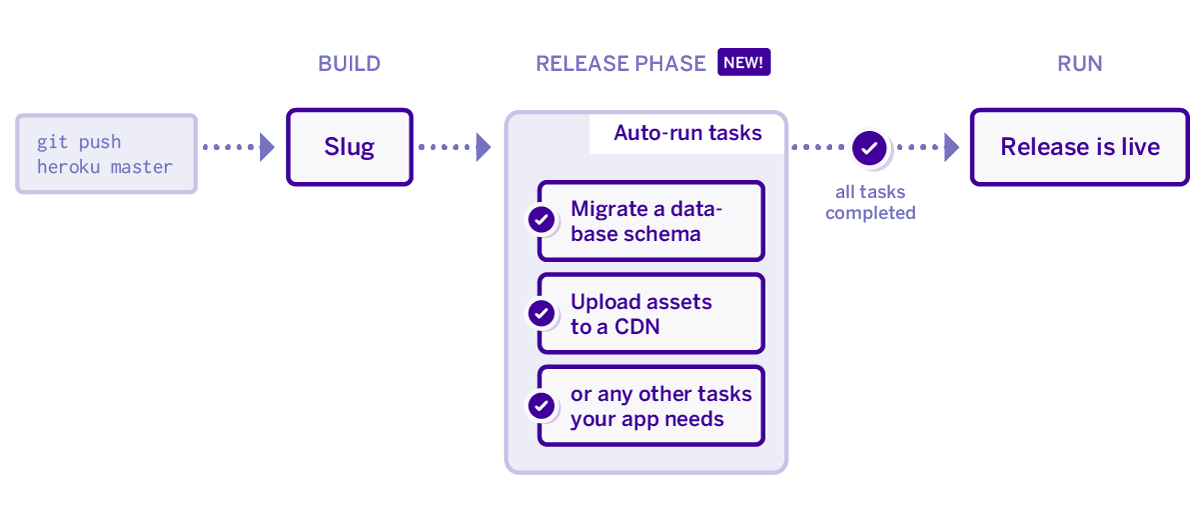
## Deploying to Heroku
|
|
|
|
We use Heroku's
|
|
[Release Phase](https://devcenter.heroku.com/articles/release-phase) feature.
|
|
Upon deploy, the app installs dependencies, bundles assets, and gets the app
|
|
ready for launch. However, before it launches and releases the app Heroku runs a
|
|
release script on a one-off dyno. If that release script/step succeeds the new
|
|
app is released on all of the dynos. If that release script/step fails then the
|
|
deploy is halted and we are notified.
|
|
|
|
The name of the script we use is `release-tasks.sh` and its in our root
|
|
directory. During this release step we do a few checks.
|
|
|
|
1. We first check the DEPLOY_STATUS environment variable. In the event that we
|
|
want to prevent deploys, for example after a rollback, we will set
|
|
DEPLOY_STATUS to "blocked". This will cause the release script to exit with a
|
|
code of 1 which will halt the deploy. This ensures that we don't accidentally
|
|
push out code while we are waiting for a fix or running other tasks.
|
|
2. We run any outstanding migrations. This ensures that a migration finishes
|
|
successfully before the code that uses it goes live.
|
|
3. We run any data update scripts that need to be run. A data update script is
|
|
one that allows us to update data in the background separate from a
|
|
migration.
|
|
4. Following updating all of our datastores we use the Rails runner to output a
|
|
simple string. Executing a Rails runner command ensures that we can boot up
|
|
the entire app successfully before it is deployed. We deploy asynchronously,
|
|
so the website is running the new code a few minutes after deploy. A new
|
|
instance of Heroku Rails console will immediately run a new code.
|
|
|
|
|