 3b73038919
* Update more Forem to DEV language

* Update readme with more Forem language

* Use Forem favicon, thanks @atsmith813!
97 lines
3.9 KiB
Markdown
97 lines
3.9 KiB
Markdown
---
|
|
title: Twitter Authentication
|
|
---
|
|
|
|
# Twitter App and Authentication
|
|
|
|
Forem allows you to authenticate using Twitter. In order to use this
|
|
authentication method in local development, you will need to setup a Twitter App
|
|
and retrieve its keys. Then you'll need to provide these keys to the Rails
|
|
application.
|
|
|
|
## Sign up
|
|
|
|
1. [Sign in](https://developer.twitter.com/apps) to your Twitter account.
|
|
|
|
2. In order to get the API keys, you will have to
|
|
[apply for a developer account](https://developer.twitter.com/en/apply-for-access).
|
|
Click the **Apply** button.
|
|
|
|

|
|
|
|
3. Setup your Twitter account. Be sure you have your phone number and email
|
|
address filled in.
|
|
|
|

|
|
|
|
4. Fill in your account information and give a name to your **developer
|
|
account**.
|
|
|
|

|
|
|
|
5. Write down the reasons that you want to use Twitter API. Mention Forem's
|
|
community and describe the issues and tests and things that you want to work
|
|
on. Copy it, you might use it later ;)
|
|
|
|

|
|
|
|
6. Read :) and accept the Terms and Conditions.
|
|
|
|

|
|
|
|
7. Verify your email address once more, and you will be done.
|
|
|
|
8. You are done.
|
|
|
|
## Get API keys
|
|
|
|
1. [Sign up](#twitter-sign-up) or [sign in](https://developer.twitter.com/apps)
|
|
to your Twitter developer account.
|
|
|
|
2. From **Apps** dashboard, click on **Create and app**.
|
|
|
|

|
|
|
|
3. Fill in the app name, description, and URL `https://dev.to`.
|
|
|
|

|
|
|
|
4. Check the **Enable Sign in with Twitter** option and fill in the Callback URL
|
|
`http://localhost:3000/users/auth/twitter/callback` (or whatever port you run
|
|
Forem on).
|
|
|
|

|
|
|
|
5. Fill in the information, **Terms of Service** `http://dev.to/terms` and
|
|
**Privacy policy** `http://dev.to/privacy`.
|
|
|
|

|
|
|
|
6. Write down (or paste) the things that you will work on. Press **Create**.
|
|
|
|

|
|
|
|
7. Review the
|
|
[Twitter Developer Terms](https://developer.twitter.com/en/developer-terms/agreement-and-policy.html)
|
|
and agree to do nothing sketchy.
|
|
|
|

|
|
|
|
8. The app is all set!
|
|
|
|
9. One more change: From the app dashboard, go to **Permissions** and check
|
|
**Request email addresses from users** option.
|
|
|
|

|
|
|
|
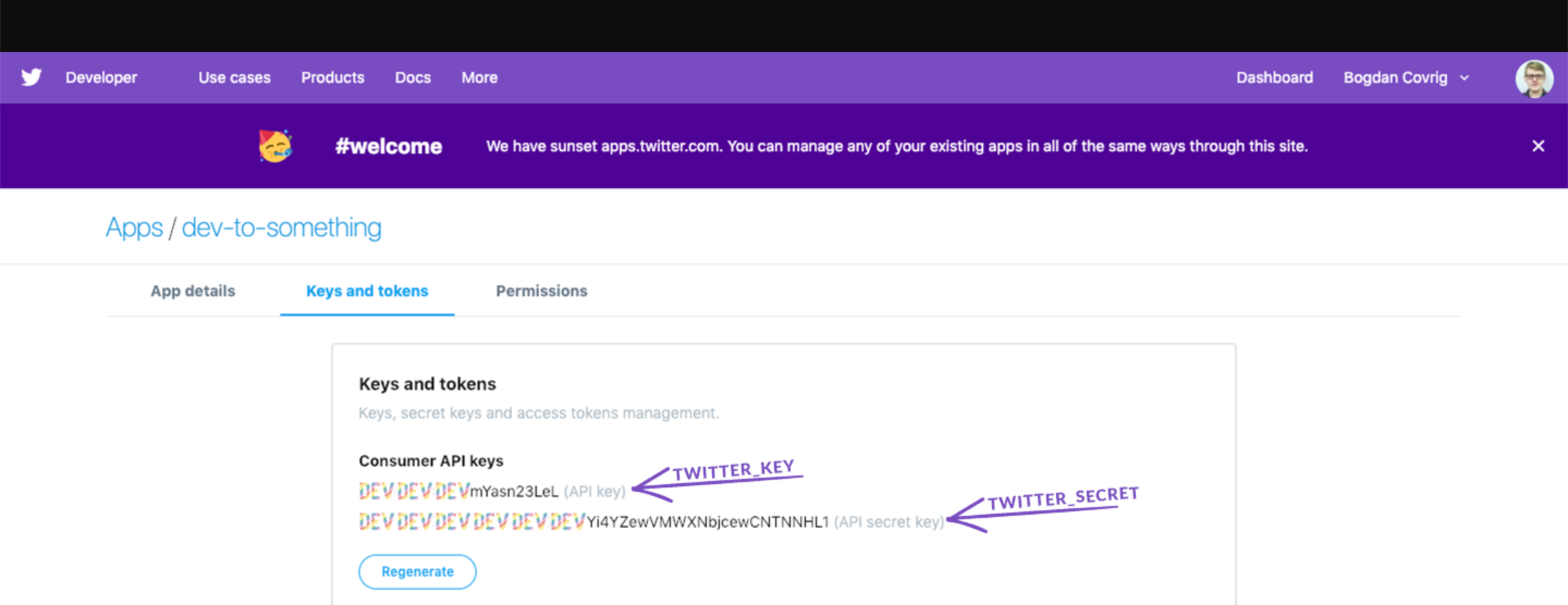
10. From the same dashboard access the **Keys and tokens** and change them
|
|
accordingly (name of Twitter key -> name of our `ENV` variable). Be sure to
|
|
copy the _access token_ and _access token secret_ right away because it will
|
|
be hidden from you in the future.
|
|
|
|
```text
|
|
API key -> TWITTER_KEY
|
|
API secret key -> TWITTER_SECRET
|
|
```
|
|
|
|
|