7d0aeeefe5
* Improve format and clarity of the docs [ci skip]

While this change produces a lot of git noise by enacting what seems
like an arbitrary linewrap on most of the files in the documentation it
will result in better version control and tracking of the changes in the
documentation.

For example, as it currently stands, if one was to make a
PR to move a comma in a sentence because each paragraph in most of the
files is on a single line, that small change would look in the git
history like the author had modified the entire paragraph. In reality,
this author just moved a comma.

This change also includes a significant number of modifications to the
more article-esque docs. Many of these docs were written in a sort of
stream-of-conciousness and aren't as easy to read as they could be.
Hopefully this is the first of several readability changes. If we could
get these docs to a more accessible reading level, we would probably see
an increase in contributions. :)

* Delegate markdown wrapping to Prettier

* Add linewrapping explanation in the docs [ci skip]
2.1 KiB
| title |
|---|
| Deployment and CI/CD Process |
Deployment and CI/CD Process
Overview
DEV relies on GitHub and Travis to deploy continuously to Heroku. If a Pull
Request is merged with a [deploy] in its title, it will be automatically
deployed to production once the build steps complete successfully. The process
currently takes about 20 minutes to complete and will need a few additional
minutes before the change goes live.
Travis steps
The following steps can be explored in our .travis.yml and Procfile. Some of the steps will be parallelized in the future:
- Travis runs the test portion of Rails code.
- Travis runs the test portion of Preact code.
- CodeClimate-test-reporter combines the test result and coverage from Ruby and JavaScript code then uploads it to our CodeClimate dashboard.
bundle-auditchecks for any known vulnerability.- Travis builds Storybook to ensure its integrity.
- Travis deploys code to Heroku.
- Heroku runs the database migrations before deployment.
after_deployscript kicks in.- Airbrake Deploy Tracking is notified of the deployment.
- Travis notifies the team that the process completed.
Deploying to Heroku
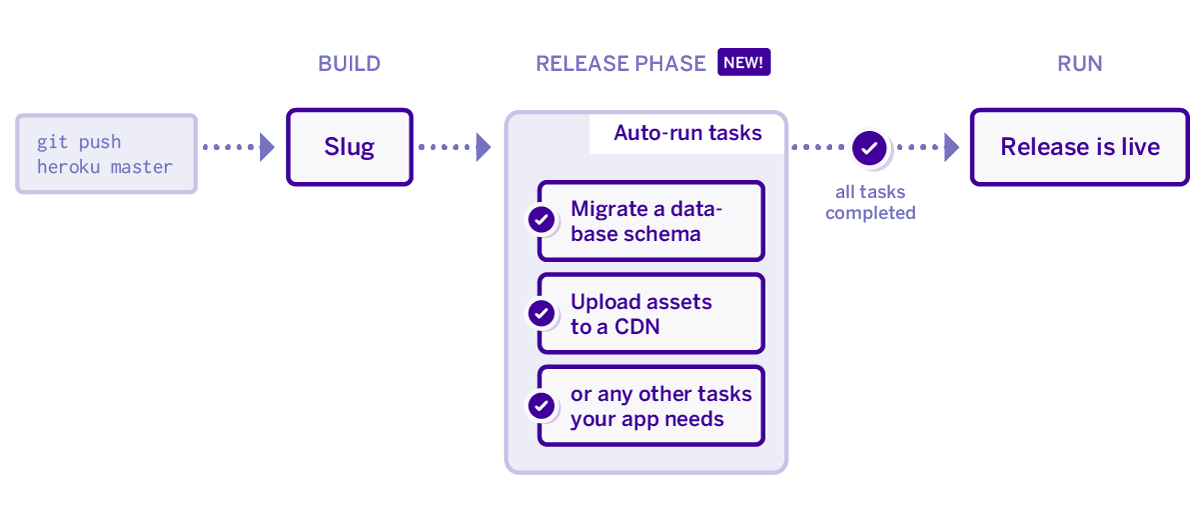
We use Heroku's Release Phase feature. Upon deploy, the app installs dependencies, bundles assets, and gets the app ready for launch. However, before it launches and releases the app Heroku runs a release script on a one-off dyno. If that release script/step succeeds the new app is released on all of the dynos. If that release script/step fails then the deploy is halted and we are notified. During this release step, we have chosen to run migrations. This ensures that a migration finishes successfully before the code that uses it goes live. We deploy asynchronously, so the website is running the new code a few minutes after deploy. A new instance of Heroku Rails console will immediately run a new code.