 f4a10e4a44
* Adds a new admin setting for experience levels.

This is used in the post management UI to determine the range of experience. These values fallback to the ones we currently see in DEV, Total Newbies and Senior Devs. There is also a removal of the word coding when talking about experience level, since the context for each forem instance should be implied when referencing experience.

* Cleans up experience defaults

* Fixes instance_of usage
97 lines
3.9 KiB
Markdown
97 lines
3.9 KiB
Markdown
---
|
|
title: Twitter Authentication
|
|
---
|
|
|
|
# Twitter App and Authentication
|
|
|
|
Forem allows you to authenticate using Twitter. In order to use this
|
|
authentication method in local development, you will need to setup a Twitter App
|
|
and retrieve its keys. Then you'll need to provide these keys to the Rails
|
|
application.
|
|
|
|
## Sign up
|
|
|
|
1. [Sign in](https://developer.twitter.com/apps) to your Twitter account.
|
|
|
|
2. In order to get the API keys, you will have to
|
|
[apply for a developer account](https://developer.twitter.com/en/apply-for-access).
|
|
Click the **Apply** button.
|
|
|
|

|
|
|
|
3. Setup your Twitter account. Be sure you have your phone number and email
|
|
address filled in.
|
|
|
|

|
|
|
|
4. Fill in your account information and give a name to your **developer
|
|
account**.
|
|
|
|

|
|
|
|
5. Write down the reasons that you want to use Twitter API. Mention Forem's
|
|
community and describe the issues and tests and things that you want to work
|
|
on. Copy it, you might use it later ;)
|
|
|
|

|
|
|
|
6. Read :) and accept the Terms and Conditions.
|
|
|
|

|
|
|
|
7. Verify your email address once more, and you will be done.
|
|
|
|
8. You are done.
|
|
|
|
## Get API keys
|
|
|
|
1. [Sign up](#twitter-sign-up) or [sign in](https://developer.twitter.com/apps)
|
|
to your Twitter developer account.
|
|
|
|
2. From **Apps** dashboard, click on **Create and app**.
|
|
|
|

|
|
|
|
3. Fill in the app name, description, and URL `https://dev.to`.
|
|
|
|

|
|
|
|
4. Check the **Enable Sign in with Twitter** option and fill in the Callback URL
|
|
`http://localhost:3000/users/auth/twitter/callback` (or whatever port you run
|
|
Forem on).
|
|
|
|

|
|
|
|
5. Fill in the information, **Terms of Service** `http://dev.to/terms` and
|
|
**Privacy policy** `http://dev.to/privacy`.
|
|
|
|

|
|
|
|
6. Write down (or paste) the things that you will work on. Press **Create**.
|
|
|
|

|
|
|
|
7. Review the
|
|
[Twitter Developer Terms](https://developer.twitter.com/en/developer-terms/agreement-and-policy.html)
|
|
and agree to do nothing sketchy.
|
|
|
|

|
|
|
|
8. The app is all set!
|
|
|
|
9. One more change: From the app dashboard, go to **Permissions** and check
|
|
**Request email addresses from users** option.
|
|
|
|

|
|
|
|
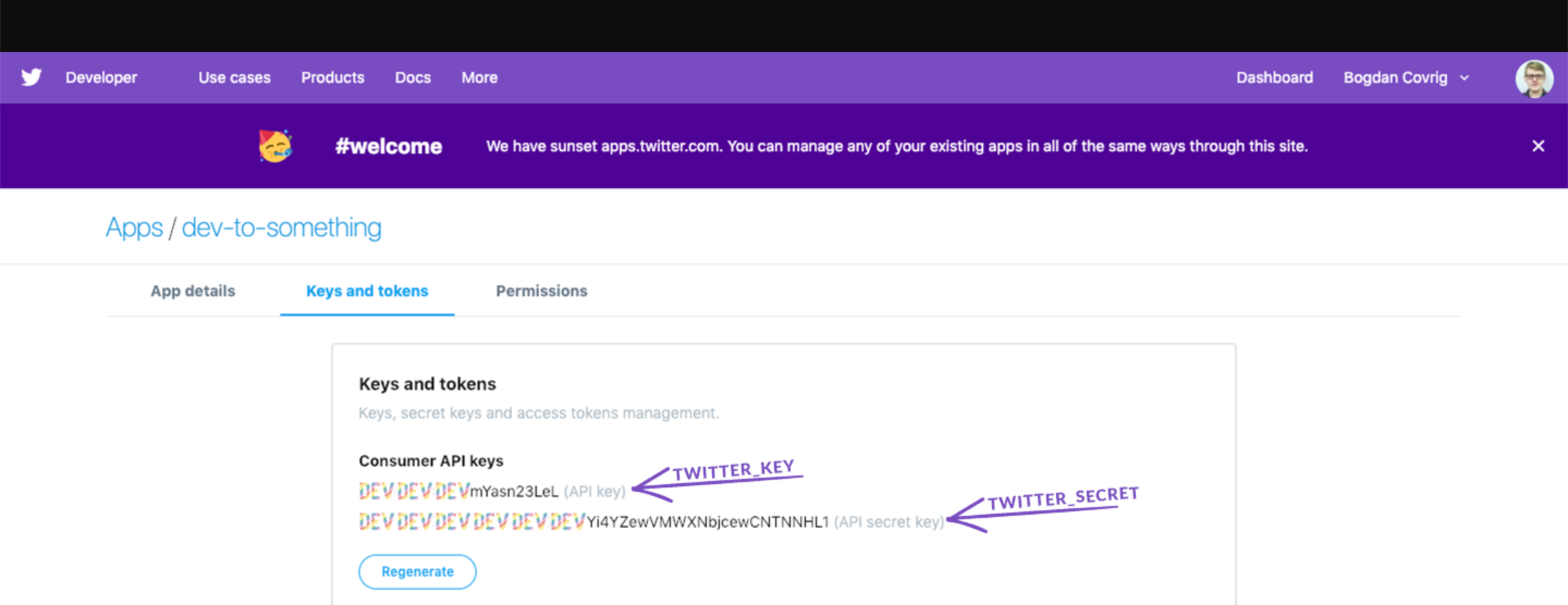
10. From the same dashboard access the **Keys and tokens** and add them to your
|
|
`.env` file accordingly (name of Twitter key -> name of our `ENV` variable).
|
|
Be sure to copy the _access token_ and _access token secret_ right away
|
|
because it will be hidden from you in the future.
|
|
|
|
```text
|
|
API key -> TWITTER_KEY
|
|
API secret key -> TWITTER_SECRET
|
|
```
|
|
|
|
|