
127 lines
4.5 KiB
Markdown
127 lines
4.5 KiB
Markdown
---
|
|
title: Containers
|
|
---
|
|
|
|
# Installing Forem using Containers
|
|
|
|
If you encounter any errors with our Container setup, please kindly
|
|
[report any issues](https://github.com/forem/forem/issues/new/choose)!
|
|
|
|
## Installing prerequisites
|
|
|
|
_These prerequisites assume you're working on an operating system supported by
|
|
Docker or Podman._
|
|
|
|
### Choosing a Container Engine
|
|
|
|
A container engine is software that runs and manages containers on a computer.
|
|
One of the most widely known Container Engines is Docker, but there are many
|
|
other Container Engines available, such as [Podman](https://podman.io/),
|
|
[CRI-O](https://cri-o.io/), and
|
|
[LXD](https://linuxcontainers.org/lxd/introduction/).
|
|
|
|
Forem supports two Container Engines: Docker and Podman.
|
|
|
|
### Docker
|
|
|
|
Forem can be setup with Docker and Docker Compose on macOS or Linux systems.
|
|
|
|
Docker is available for many different operating systems. You may use Docker as
|
|
your Container Engine on both macOS and Linux workstations. As of right now
|
|
Docker is the only Container Engine for macOS and we recommend you follow the
|
|
[Docker Desktop on Mac](https://docs.docker.com/docker-for-mac/install/),
|
|
install instructions to get Docker and Docker Compose installed.
|
|
|
|
Docker also works well on Linux distributions that have not moved to cgroup v2.
|
|
You can install it by following their
|
|
[Installation per distro](https://docs.docker.com/engine/install/) to get Docker
|
|
and you can install Docker Compose by following these
|
|
[instructions](https://docs.docker.com/compose/install/).
|
|
|
|
### Podman
|
|
|
|
Forem can be setup with Podman and Podman Compose on Linux systems.
|
|
|
|
[Podman](https://podman.io/) is an FOSS project that provides a Container Engine
|
|
that is daemonless which only runs on Linux systems. It can be run as the root
|
|
user or as a non-privileged user. It also provides a Docker-compatible command
|
|
line interface. Podman is available on many different Linux distributions and it
|
|
can be installed by following these
|
|
[instructions](https://podman.io/getting-started/installation).
|
|
|
|
[Podman Compose](https://github.com/containers/podman-compose) is a an early
|
|
project under development that is implementing docker-compose like experience
|
|
with Podman. You can install it by following these
|
|
[instructions](https://github.com/containers/podman-compose#installation).
|
|
|
|
## Setting up Forem
|
|
|
|
1. Fork Forem's repository, e.g. <https://github.com/forem/forem/fork>
|
|
1. Clone your forked repository, eg.
|
|
`git clone https://github.com/<your-username>/forem.git`
|
|
1. Set up your environment variables/secrets
|
|
|
|
1. Create `.env` by copying from the provided template`.env_sample` (i.e.
|
|
with bash: `cp .env_sample .env`).
|
|
|
|
- `.env` is a personal file that is **ignored in git**.
|
|
- `.env` lists all the `ENV` variables we use and provides a fake
|
|
default for any missing keys.
|
|
|
|
2. For any key that you wish to enter/replace:
|
|
|
|
- You do not need "real" keys for basic development. Some features
|
|
require certain keys, so you may be able to add them as you go.
|
|
- The [backend guide](/backend) will show you how to get free API keys
|
|
for additional services that may be required to run certain parts of
|
|
the app.
|
|
- Obtain the development variable and apply the key you wish to
|
|
enter/replace. i.e.:
|
|
|
|
```shell
|
|
export CLOUDINARY_API_KEY="SOME_REAL_SECURE_KEY_HERE"
|
|
export CLOUDINARY_API_SECRET="ANOTHER_REAL_SECURE_KEY_HERE"
|
|
export CLOUDINARY_CLOUD_NAME="A_CLOUDINARY_NAME"
|
|
```
|
|
|
|
## Running Forem with Docker via docker-compose
|
|
|
|
1. Run `bin/container-setup`
|
|
2. That's it! Navigate to <http://localhost:3000>
|
|
|
|
The script executes the following steps:
|
|
|
|
1. `docker-compose build`
|
|
2. `docker-compose up`
|
|
|
|
## Running Forem with Podman via podman-compose
|
|
|
|
1. Run `bin/container-setup`
|
|
2. That's it! Navigate to <http://localhost:3000>
|
|
|
|
The script executes the following steps:
|
|
|
|
1. `podman-compose build`
|
|
2. `podman-compose up`
|
|
|
|
## Known Problems & Solutions
|
|
|
|
### Docker on Mac
|
|
|
|
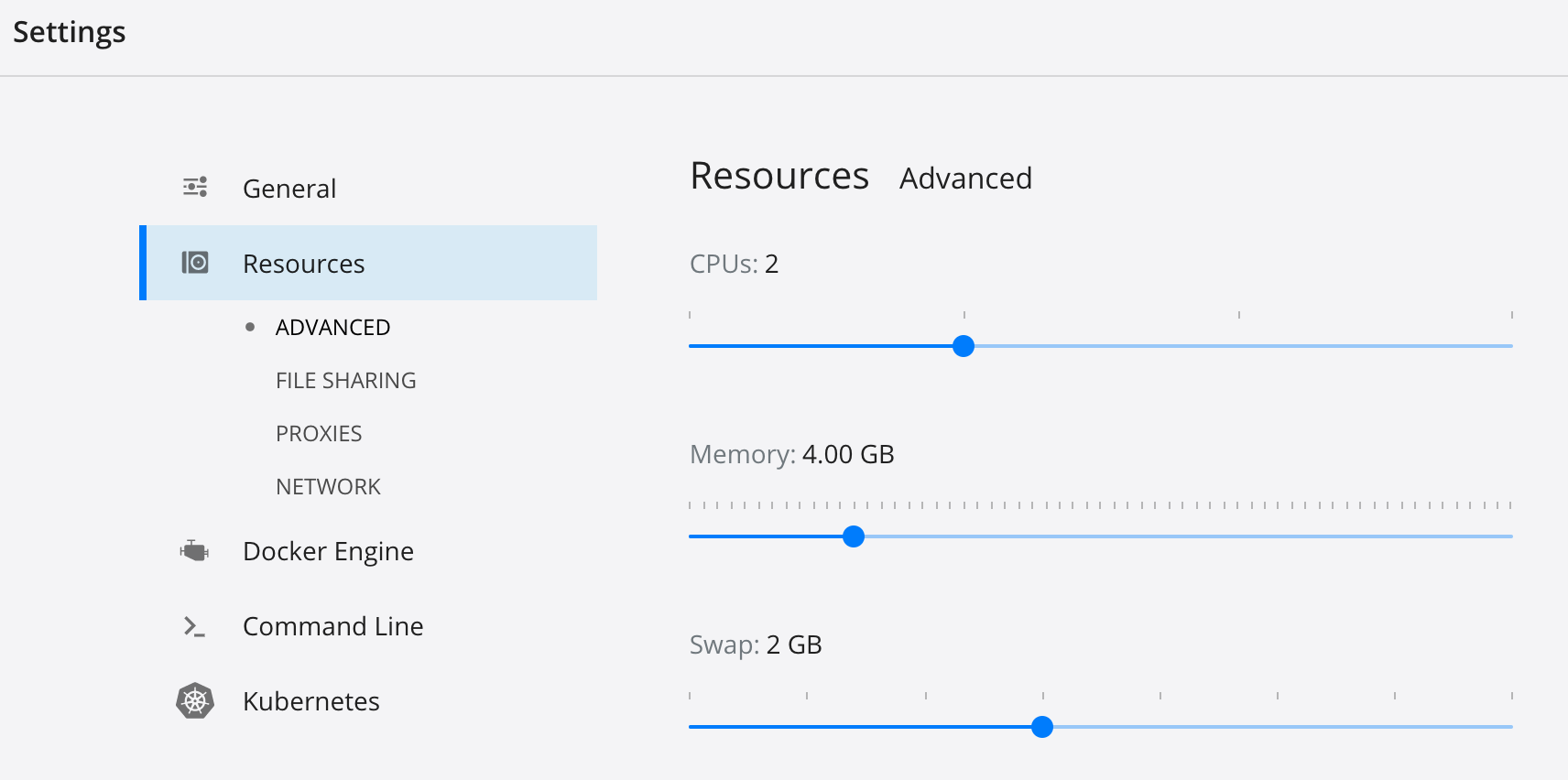
- Should you experience problems with the Elasticsearch container, try to
|
|
increase the memory and/or swap allocation for Docker. On macOS this can be
|
|
done via the GUI:
|
|
|
|
|
|
|
|
- In case `rails server` starts with the following message:
|
|
|
|
```shell
|
|
Data update scripts need to be run before you can start the application. Please run rails data_updates:run (RuntimeError)
|
|
```
|
|
|
|
run the following command:
|
|
|
|
```shell
|
|
docker-compose run rails rails data_updates:run
|
|
```
|