
4.5 KiB
| title |
|---|
| Containers |
Installing Forem using Containers
If you encounter any errors with our Container setup, please kindly report any issues!
Installing prerequisites
These prerequisites assume you're working on an operating system supported by Docker or Podman.
Choosing a Container Engine
A container engine is software that runs and manages containers on a computer. One of the most widely known Container Engines is Docker, but there are many other Container Engines available, such as Podman, CRI-O, and LXD.
Forem supports two Container Engines: Docker and Podman.
Docker
Forem can be setup with Docker and Docker Compose on macOS or Linux systems.
Docker is available for many different operating systems. You may use Docker as your Container Engine on both macOS and Linux workstations. As of right now Docker is the only Container Engine for macOS and we recommend you follow the Docker Desktop on Mac, install instructions to get Docker and Docker Compose installed.
Docker also works well on Linux distributions that have not moved to cgroup v2. You can install it by following their Installation per distro to get Docker and you can install Docker Compose by following these instructions.
Podman
Forem can be setup with Podman and Podman Compose on Linux systems.
Podman is an FOSS project that provides a Container Engine that is daemonless which only runs on Linux systems. It can be run as the root user or as a non-privileged user. It also provides a Docker-compatible command line interface. Podman is available on many different Linux distributions and it can be installed by following these instructions.
Podman Compose is a an early project under development that is implementing docker-compose like experience with Podman. You can install it by following these instructions.
Setting up Forem
-
Fork Forem's repository, e.g. https://github.com/forem/forem/fork
-
Clone your forked repository, eg.
git clone https://github.com/<your-username>/forem.git -
Set up your environment variables/secrets
-
Take a look at
.env_sample. This file lists all theENVvariables we use and provides a fake default for any missing keys. -
The backend guide will show you how to get free API keys for additional services that may be required to run certain parts of the app.
-
For any key that you wish to enter/replace:
- Create
.envby copying from the provided template (i.e. with bash:cp .env_sample .env). This is a personal file that is ignored in git. - Obtain the development variable and apply the key you wish to enter/replace. i.e.:
export CLOUDINARY_API_KEY="SOME_REAL_SECURE_KEY_HERE" export CLOUDINARY_API_SECRET="ANOTHER_REAL_SECURE_KEY_HERE" export CLOUDINARY_CLOUD_NAME="A_CLOUDINARY_NAME" - Create
-
You do not need "real" keys for basic development. Some features require certain keys, so you may be able to add them as you go.
-
Running Forem with Docker via docker-compose
- Run
bin/container-setup - That's it! Navigate to http://localhost:3000
The script executes the following steps:
docker-compose builddocker-compose up
Running Forem with Podman via podman-compose
- Run
bin/container-setup - That's it! Navigate to http://localhost:3000
The script executes the following steps:
podman-compose buildpodman-compose up
Known Problems & Solutions
Docker on Mac
-
Should you experience problems with the Elasticsearch container, try to increase the memory and/or swap allocation for Docker. On macOS this can be done via the GUI:
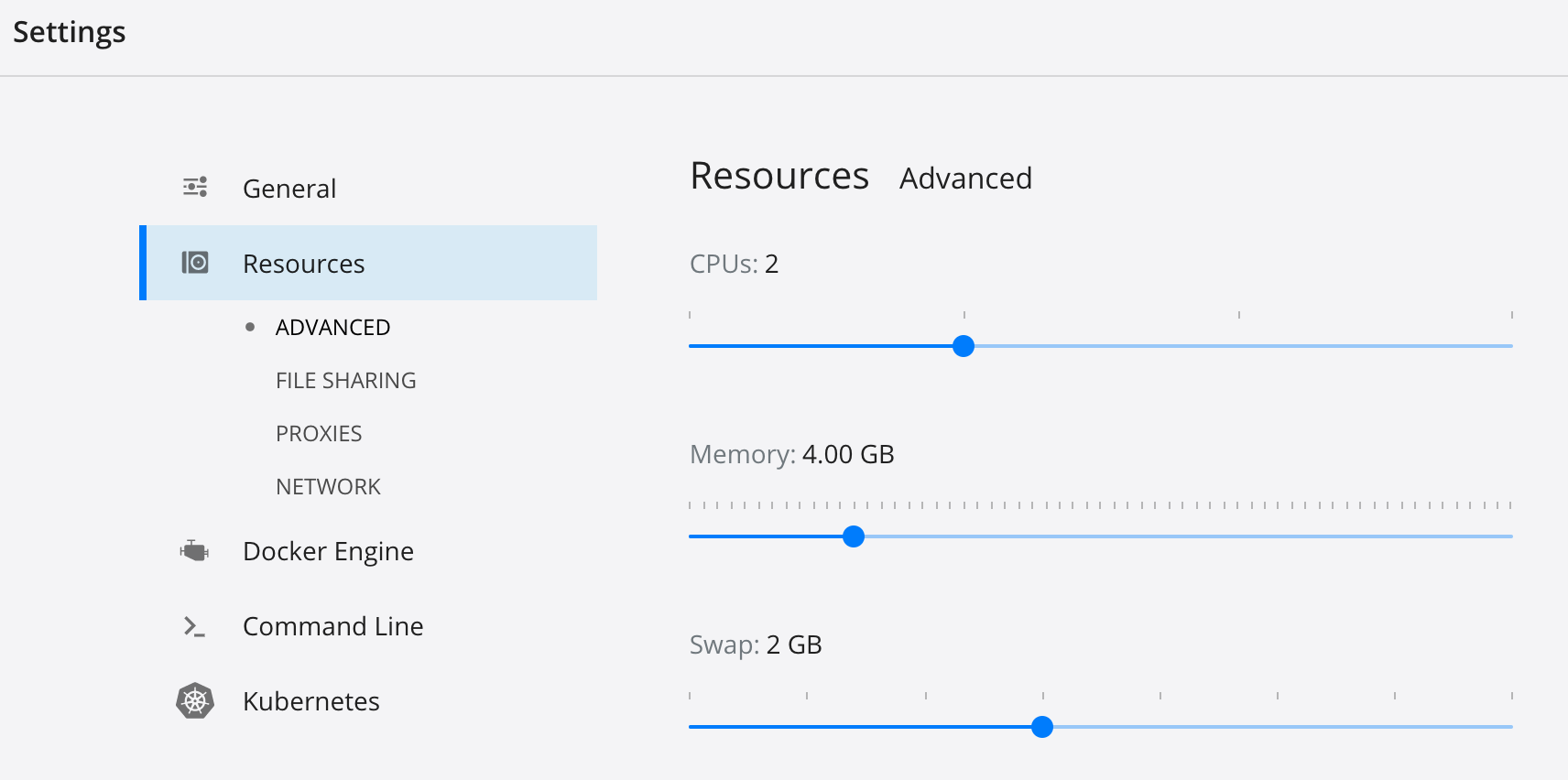
-
In case
rails serverdoesn't start with the following message:Data update scripts need to be run before you can start the application. Please run rails data_updates:run (RuntimeError)run the following command:
docker-compose run web rails data_updates:run