
67 lines
3.3 KiB
Markdown
67 lines
3.3 KiB
Markdown
---
|
|
title: Deployment and CI/CD Process
|
|
---
|
|
|
|
# Deployment and CI/CD Process
|
|
|
|
## Overview
|
|
|
|
DEV relies on GitHub and Travis to deploy continuously to Heroku. If a Pull
|
|
Request is merged with a `[deploy]` in its title, it will be automatically
|
|
deployed to production once the build steps complete successfully. The process
|
|
currently takes about 20 minutes to complete and will need a few additional
|
|
minutes before the change goes live.
|
|
|
|
## Travis steps
|
|
|
|
The following steps can be explored in our
|
|
[.travis.yml](https://github.com/thepracticaldev/dev.to/blob/master/.travis.yml)
|
|
and [Procfile](https://github.com/thepracticaldev/dev.to/blob/master/Procfile).
|
|
Some of the steps will be parallelized in the future:
|
|
|
|
1. Travis runs the test portion of Rails code.
|
|
1. Travis runs the test portion of Preact code.
|
|
1. CodeClimate-test-reporter combines the test result and coverage from Ruby and
|
|
JavaScript code then uploads it to our CodeClimate dashboard.
|
|
1. `bundle-audit` checks for any known vulnerability.
|
|
1. Travis builds Storybook to ensure its integrity.
|
|
1. Travis deploys code to Heroku.
|
|
- Heroku runs the database migrations and Elasticsearch updates before
|
|
deployment.
|
|
1. Travis notifies the team that the process completed.
|
|
|
|
## Deploying to Heroku
|
|
|
|
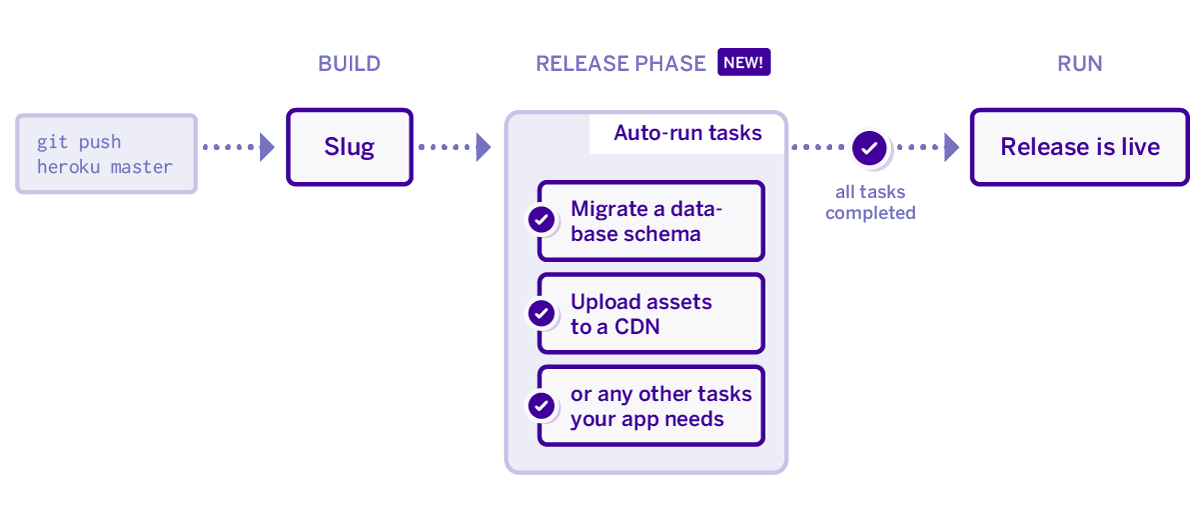
We use Heroku's
|
|
[Release Phase](https://devcenter.heroku.com/articles/release-phase) feature.
|
|
Upon deploy, the app installs dependencies, bundles assets, and gets the app
|
|
ready for launch. However, before it launches and releases the app Heroku runs a
|
|
release script on a one-off dyno. If that release script/step succeeds the new
|
|
app is released on all of the dynos. If that release script/step fails then the
|
|
deploy is halted and we are notified.
|
|
|
|
The name of the script we use is `release-tasks.sh` and its in our root
|
|
directory. During this release step we do a few checks.
|
|
|
|
1. We first check the DEPLOY_STATUS environment variable. In the event that we
|
|
want to prevent deploys, for example after a rollback, we will set
|
|
DEPLOY_STATUS to "blocked". This will cause the release script to exit with a
|
|
code of 1 which will halt the deploy. This ensures that we don't accidentally
|
|
push out code while we are waiting for a fix or running other tasks.
|
|
2. We run any outstanding migrations. This ensures that a migration finishes
|
|
successfully before the code that uses it goes live.
|
|
3. We run any data update scripts that need to be run. A data update script is
|
|
one that allows us to update data in the background separate from a
|
|
migration. For example, if we add a new field to Elasticsearch and need to
|
|
reindex all of our documents we would use a data update script.
|
|
4. We update Elasticsearch. Elasticsearch contains indexes which have mappings.
|
|
Mappings are similar to database schema. The same way we run a migration to
|
|
update our database we have to run a setup task to update any Elasticsearch
|
|
mappings.
|
|
5. Following updating all of our datastores we use the Rails runner to output a
|
|
simple string. Executing a Rails runner command ensures that we can boot up
|
|
the entire app successfully before it is deployed. We deploy asynchronously,
|
|
so the website is running the new code a few minutes after deploy. A new
|
|
instance of Heroku Rails console will immediately run a new code.
|
|
|
|
|